QR Codes for Events: Posters, Tickets, Check-In, and the Follow-Up
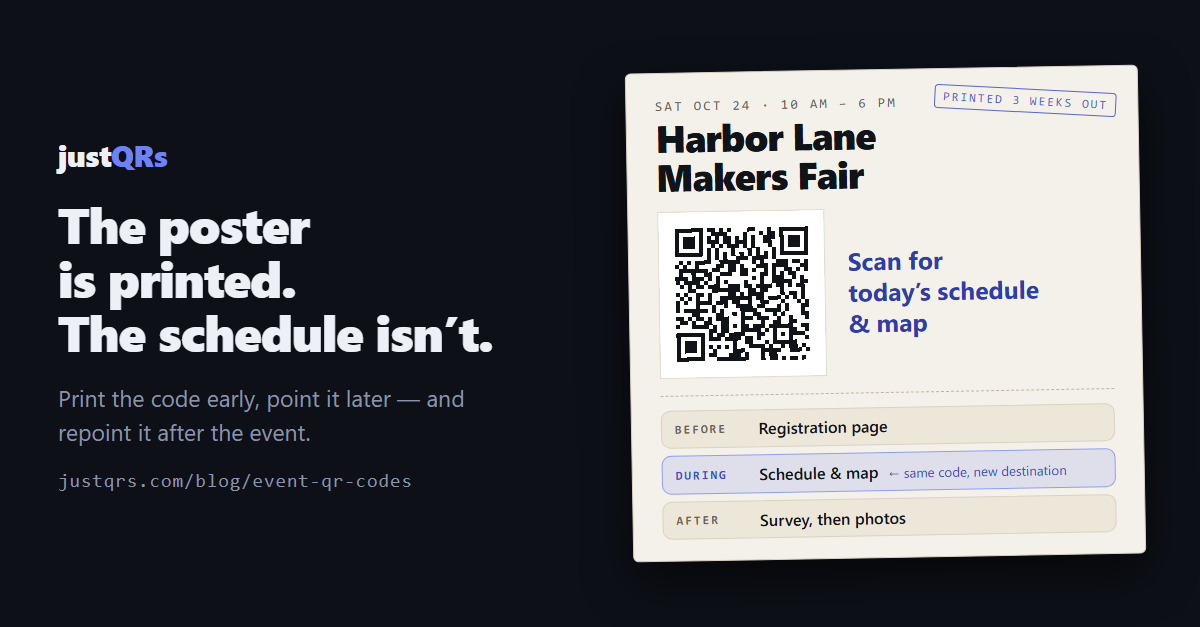
The posters went to the printer three weeks before the event. The night before doors opened, the keynote moved to the bigger room, the Saturday workshop lost its speaker, and the parking lot you told everyone to use became a construction site.
None of that is unusual. Events change right up to — and all the way through — the day itself, and the printed material is the one piece that can't. A QR code puts a layer between the paper and the facts: the pattern on the poster stays the same, and what it opens keeps up.
Here's how to use QR codes across the four moments of an event, with honest notes on where a free static code is plenty and where a QR code isn't the right tool at all.
1. Posters and signage: print early, point later
Posters, banners, the A-frame at the entrance, the sign on every session door — these are printed weeks out. They are the clearest case for a dynamic QR code: one whose destination you can change after it's printed.
Three rules separate signage that gets scanned from signage that decorates the lobby:
- One code per placement. The lobby banner, the elevator poster, and the Room B door should each carry their own code pointing at the same schedule. Afterwards, it tells you which placements people actually used.
- Keep the destination light. Five hundred phones in one ballroom share one congested network. A simple mobile schedule page loads; a 20 MB program PDF doesn't.
- Say what the scan does. "Scan for today's schedule" above the code beats a bare square every time.
Size matters more at events than almost anywhere else, because people scan posters from across a hallway. A workable rule of thumb: the code should be about one-tenth of the scanning distance — roughly 20 cm wide for a poster read from two meters.
2. Tickets: use your ticketing platform's code for admission
This is the honest part. The barcode on an admission ticket is a unique code per ticket that your ticketing platform generates and validates with its own scanner app at the door. A general-purpose QR code generator — ours included — doesn't do that. Use the ticketing system's codes to get people in.
Where a general-purpose code earns its place on the ticket or the confirmation email is the know-before-you-go link: parking, doors time, map, bag policy, schedule. Tickets go out weeks early; that information changes. A dynamic code on the ticket stock means the parking change reaches people without a mass email half of them won't open.
For a free event with no ticketing at all, a dynamic code to the RSVP form is the natural choice — when you hit capacity, the same code on the same flyer opens the waitlist instead.
3. Check-in and the day itself
At the door, the ticketing app handles admission. QR codes handle everything around it:
- Walk-up registration. A code at the desk that opens the registration form, so the line moves while staff handle exceptions.
- Wi-Fi. A Wi-Fi code encodes the network name and password directly; a phone joins when it scans. This is a static code — it never needs to change, so it should be free.
- Schedule and map. The same destination as the posters, repeated on badges and programs. If the room moves, one edit updates all of them.
- An event hub. Rather than six separate codes, one code can open a simple hosted page linking to the schedule, map, Wi-Fi details, sponsors, and feedback form.
- Feedback. Point exit signage at a short survey during the closing session, while opinions are fresh.
Be realistic about what people will scan: nobody fills in a five-minute form during the keynote. Scan to get something, and save the asking for later.
4. The follow-up: the part most events skip
The event ends, and the codes are still out there: on lanyards, on tote bags, on the sticker someone put on a laptop. With dynamic codes that's an asset rather than litter, because you can repoint them after the event:
- Day of: the schedule.
- Closing session: the feedback survey.
- The next morning: the photo gallery and the slides.
- A month later: next year's registration page.
The same printed square carries attendees through all four. And because every scan of a dynamic code is counted, the debrief gets answers: did the elevator poster outperform the lobby banner? Which day did people actually look at the schedule? Plan next year's signage from data instead of memory.
The event QR checklist
Worth saving — or handing to whoever is running signage.
Before anything goes to print
- Decide static or dynamic for each code. Wi-Fi, a contact card, a link that will never move: static, and free. Anything that might change, or that you want to count: dynamic.
- Give every placement its own code and name them clearly: "Lobby banner," "Room B door," "Badge back."
- Put a three-to-six-word call to action next to every code.
- Size for the scanning distance, keep dark modules on a light background, and leave clear space around the code.
- Scan the printer's proof from the real distance, on two phones, before approving the run.
On the day
- Scan every code the morning of, on the venue's own network.
- Name one person who can change destinations during the event, logged in before doors open.
After
- Repoint within 24 hours: survey first, then photos and slides, then next year's registration.
- Read the per-code scan numbers while the event is fresh and note what you'd change.
Where justQRs fits
justQRs is built for exactly the "print early, point later" pattern that events demand:
- Dynamic codes you can repoint any time. A code is stable the moment it's created, so banners and badges can go to print weeks out. Changing the destination is a dashboard edit — the paper never changes.
- Bulk import for dozens of sessions. Upload a CSV with one row per session or placement and justQRs creates a named, tracked code for each, up to 100 per upload.
- A hosted event hub, no website needed. Put up to 20 links behind a single scan — schedule, map, Wi-Fi, sponsors, feedback.
- Per-code analytics. Scans and daily uniques by day, with breakdowns by country, city, device, OS, and browser, so the debrief has numbers.
- Room for the whole team. The paid plan is $9.99/month or $89/year for 500 dynamic codes with unlimited scans and five seats, so the volunteer coordinator and the marketing lead can both make changes on the day.
- Static codes are free forever. Wi-Fi cards, contact cards, and permanent links cost nothing — no watermarks, no expiry.
The honest limit: justQRs is not a ticketing system. Your ticketing platform handles admission; justQRs handles everything printed around it.
A free justQRs account designs and downloads static QR codes forever — no watermarks, no expiry. And if you want codes you can edit and track, every feature is free for 7 days, no card required.
Need a QR code? Generate a static code free — no account — or see what dynamic codes cost.