7 QR Code Mistakes That Kill Your Scan Rate
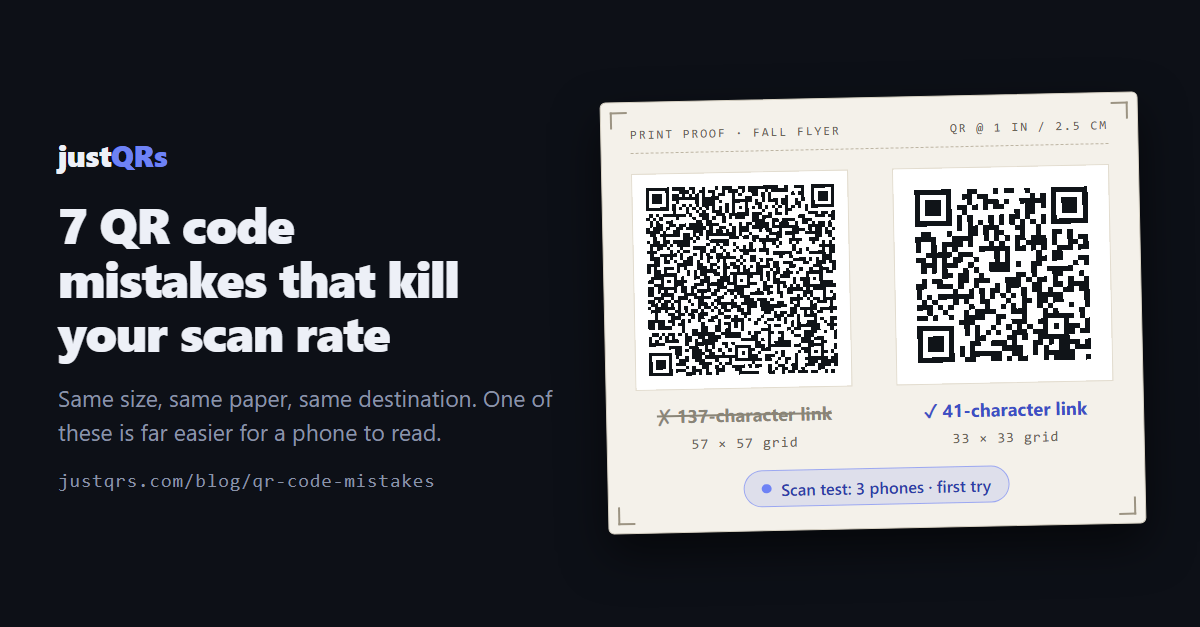
The flyer went to 2,000 mailboxes. The QR code went in the corner, sized to fit whatever space was left after the photo, the offer, and the logo. A month later someone asks how many people scanned it — and the honest answer is "not many," with nobody quite sure why.
It's usually one of seven mistakes, and every one is fixable before the file goes to the printer. The first five stop the camera from reading the code. The last two stop the person from bothering.
1. The code is too small for the distance
The working rule of thumb: a QR code should be about one-tenth as wide as the distance it's scanned from. Anything held in the hand — a business card, flyer, or product label — needs at least 2 cm (0.8 in). A counter sign at arm's length is comfortable at 1–1.5 inches. A poster read from 10 feet away needs a code about 12 inches (30 cm) wide, which is always bigger than the designer wants.
Decide the code's size first, from where the reader will stand, and lay everything else out around it.
2. The code is carrying too much data
Every character you encode adds squares. At the same printed size, more squares means smaller squares — and smaller squares are harder for a phone to resolve.
The difference isn't subtle. At a common error-correction setting, a 29-character short link makes a 29×29 grid; a 168-character link to a PDF with four tracking parameters makes a 61×61 grid. Print both at one inch and the long link's squares are less than half as wide.
The fixes: drop tracking parameters you'll never read, point the code at a short URL on your own domain that redirects to the long one, or use a dynamic code, whose pattern only ever holds its own short link. If your URL is already short, a static code is perfectly fine.
3. There's no quiet zone
Scanners find a code by its edges, so it needs empty margin on every side — about four squares' worth. That margin gets eaten by a border drawn tight around the code, a headline set right against it, a patterned background, or a trim line that shaves the edge. A crowded code is the classic code that "works on my phone" and nobody else's.
4. The contrast is wrong
QR codes want dark squares on a light background. The usual ways to break that: pale brand colors, inverted light-on-dark codes (many phones cope; some scanners don't), gradients that fade to light in one corner, a transparent-background PNG dropped onto dark packaging, and glossy lamination or foil that throws glare into the camera.
Quick test: print it in grayscale. If the squares aren't obviously dark on obviously light, fix the colors first.
5. The design fights the code
Colors, rounded dots, and a logo are all fine — within limits. QR codes carry built-in redundancy called error correction, which lets them scan when partly damaged or covered. There are four levels, from L (roughly 7% recoverable) through M and Q to H (roughly 30%).
A logo spends that budget. Keep it modest and raise error correction to H when you add one. Leave the three large corner squares recognizable — they're how the scanner locates the code, and over-styling them is the fastest way to break a beautiful design. And since higher error correction adds squares too, keep the encoded link short.
6. Nobody knows why they should scan it
A bare code is a request with no reason attached. Say what people get — "Scan for the full menu," "Scan to book a showing" — and print a short URL underneath for the camera that won't cooperate.
Then put it where a phone already is: at hand or eye height, not above a doorway, and not in a basement with no signal.
7. The page on the other end lets them down
The camera read the code; the person still bounced. Common culprits: a slow or desktop-only page, a cookie wall followed by a login, a cloud-drive preview that asks for sign-in, an app-install demand — or a dead link, including codes from "free" generators that route through their own domain and stop working when the free tier ends.
The scan rate that matters is people who arrive where you meant to send them.
The five-minute scan test
Run this before every print run:
- Print a proof at final size, on the final material if you can.
- Scan with three phones — an older Android, a current iPhone, and whichever is least like yours — using the built-in camera app.
- Scan from the real distance and angle: across the counter, from the curb, off the shelf.
- Scan in the real light: a dim dining room, a sunny window, a fluorescent hallway.
- Turn Wi-Fi off. The page should load on cellular in a few seconds.
- Use a phone that's never visited the page — no saved logins or cookies.
- Type the fallback URL by hand and confirm it lands in the same place.
- Print a grayscale copy. The code should still be crisp dark-on-light.
Finding the mistake after it's printed
One honest limit: nobody can count failed scans — a camera that can't read a code sends nothing. What you can count is successful scans, and comparisons do the diagnosis. Give each placement its own dynamic code, and when one location scans at a tenth the rate of the others, go stand in front of it. (Static codes send the phone straight to the destination, so there's nothing in the middle to count.)
Where justQRs fits
- Static codes are free forever. Design one at justqrs.com/free-qr-code-generator and download PNG or SVG — vector, sharp at any size — with no signup, watermark, or expiry. You set error correction (L, M, Q, or H) and the quiet zone yourself, and adding a logo raises error correction to H automatically. Print-ready PDF export and a saved library come with a free account.
- Dynamic codes keep the pattern simple. A justQRs dynamic code encodes only its short link — justqrs.com/q/ plus seven characters — so the pattern stays sparse however long the destination gets, and a slow or dead page can be swapped without reprinting. $9.99/month or $89/year covers 500 dynamic codes with unlimited scans, five team seats, and scan analytics (daily scans and uniques, plus country, city, device, OS, and browser).
- No fast page to send people to? Point the code at a hosted mobile page: a PDF viewer, business card, link-in-bio, or app download.
- If you stop paying, printed static codes keep working. Dynamic codes are stored, not deleted — they pause until you're back.
A free justQRs account designs and downloads static QR codes forever — no watermarks, no expiry. And if you want codes you can edit and track, every feature is free for 7 days, no card required.
Need a QR code? Generate a static code free — no account — or see what dynamic codes cost.