How to Track QR Code Scans: A Plain-English Guide to Scan Analytics
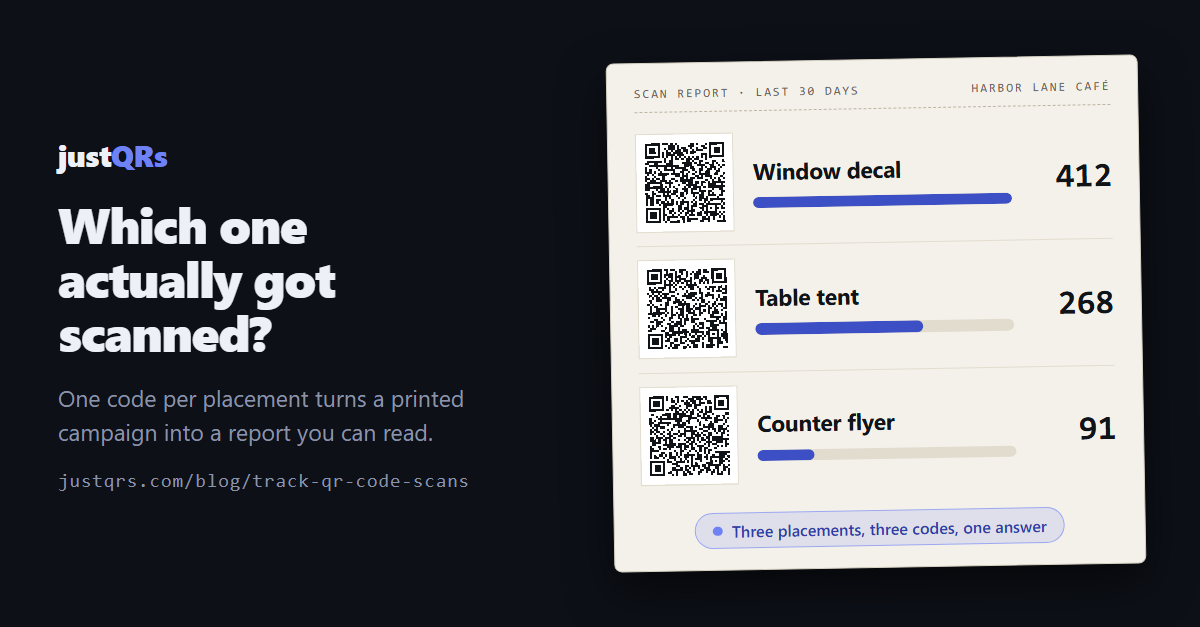
The fall promotion went out in three places: a decal on the front window, table tents on every table, and a stack of flyers by the register. Traffic is up. Someone asks which one did it, and the honest answer is "one of those three, probably."
That question is answerable, and it doesn't take a data team. It takes about fifteen minutes of setup before anything goes to the printer.
A scan is just a web request
When a phone reads a QR code, it decodes a string of text. If that string is your web address, the phone goes straight there and nothing in between ever knew the scan happened. The visit appears in your website analytics looking like someone who typed the address in — no way to tell it came off a table tent.
A dynamic QR code encodes a short link you control instead. The phone asks that link where to go, the link answers with your real destination, and the phone follows. That extra hop — a few hundred milliseconds nobody notices — is the only place a scan can be counted.
Everything else here follows from that: you can only track scans that pass through a link you control. Static codes, which encode the destination directly, can't be counted by you, and that isn't a flaw. A Wi-Fi card for the guest room or contact details on a business card should be a static code: print it, pay nobody, never think about it again. Tracking matters the moment somebody is going to ask whether the thing worked.
What scan analytics can actually tell you
The redirect hop sees a request arrive from a phone. That yields four useful things:
- When. The time of every scan, usually read as a count per day.
- Where, roughly. Country and city, derived from the network address. Treat it as a regional signal, not a street address: mobile carriers, corporate networks, and VPNs routinely place a scanner in the wrong city.
- What they scanned with. Device type (phone, tablet, desktop), operating system, and browser — educated guesswork from the browser's self-description, which gets things wrong at the edges (recent iPads describe themselves like Mac desktops), but reliable enough for the decision it's used for: "almost everyone scanning this is on a phone."
- Repeat versus new, per day. The same phone scanning twice in an afternoon is one person being indecisive, not two customers.
And what it cannot tell you, which matters just as much:
- Who scanned. A QR scan is anonymous — no name, no email address, no profile trailing someone around the internet. If a QR platform offers you that, be curious about where it's coming from.
- Whether they bought anything. The hop ends when the phone reaches your destination; connecting a scan to a sale takes one of the bridges below.
- Which physical code was scanned, if the same code is printed on all three things — the most common self-inflicted blind spot, and the next section.
The decision that makes the rest work: one code per placement
If the window decal, the table tents, and the flyers all carry the same code, your report has exactly one number on it, and you've learned nothing.
Generating a second dynamic code costs nothing and takes seconds. Reprinting doesn't. So decide placements before you print, and give each one its own code:
- Name codes after the place, not the campaign. "Fall promo — front window" beats "Fall promo 2" in three months, when you've forgotten which was which.
- Split anything you could imagine moving money between. Two locations, two magazines, the poster versus the postcard.
- Don't split past the point of usefulness. One code per table in a forty-table dining room produces forty numbers, all too small to mean anything. One code for "table tents" is the right grain.
- Keep a one-line record of what each code is, where it went, and the date it went up. A chart is much easier to read when you know what happened on the day the line jumps.
Connecting scans to outcomes
Scan counts measure attention. To measure results, bridge the gap in one of three ways.
Tag the destination with UTM parameters. These are the ?utm_source=... tags on the end
of a URL that tell your website analytics where a visitor came from. The important detail is
where they go: on the destination stored in your QR dashboard, never on the printed code.
The pattern on paper holds only the short link, so it stays sparse and easy to scan however
long the tagged URL gets. A decal pointing at
yoursite.com/fall?utm_source=window-decal&utm_medium=print then shows up in Google
Analytics as its own traffic source, right through to whatever you count as a conversion.
Give each placement something to claim. A different discount code or keyword per placement closes the loop at the register — including for the many businesses whose sales never touch a website at all.
Send each code to a page that does one thing. A scan that lands on a homepage tells you nothing; one that lands on a page whose only job is "book a table" gives you a completion rate worth comparing across placements.
Reading the numbers without fooling yourself
- Scans and unique scans answer different questions. Scans count every read; uniques typically count each phone once per day. Use uniques to estimate how many people you reached, and total scans to see how much a code gets used.
- Expect a spike, then a floor. Judge a code on the weekly floor it settles into, not on the launch bump.
- Compare like with like. A window decal on a busy street is seen by thousands; a flyer by the register by a couple hundred. The flyer with 91 scans may well be outperforming the decal with 412. Scans per opportunity is the fairer comparison, even when the denominator is only an estimate.
- Your own history is the benchmark. Published "average QR scan rates" average wildly different situations. What matters is whether this poster beat the one you ran last quarter, in the same place, for the same kind of offer.
- Check within 48 hours. A code with no scans two days in usually has a physical problem rather than a demand problem — too small, too high on the wall, poor contrast, or pointing at a page that struggles on a phone.
A fifteen-minute tracking setup
- List every physical place the code will appear.
- Create one dynamic code per place, named for the place.
- Set each destination, with UTM tags on the destination URL.
- Print a proof at final size and scan it with three different phones, Wi-Fi off.
- Write down the go-live date for each code.
- Once it's up, scan each code yourself from where a customer would stand — that catches both a bad placement and the right code going to the wrong place.
- Put a reminder in the calendar for two weeks and four weeks out.
- At review, compare placements, then change destinations instead of reprinting.
Where justQRs fits
Every dynamic code has its own stats page: lifetime scans, scans and daily uniques over the last 7, 30, or 90 days, a day-by-day chart, and top-five breakdowns by country, city, device, operating system, and browser. Scans are counted at the redirect, so there's no pixel on your site and no third-party tracker involved.
- One flat price. $9.99/month or $89/year covers 500 dynamic codes with unlimited scans, five team seats, and analytics on every code — enough codes to give every placement its own. Need more, add packs: +500 codes for $9.99/month, +5 seats for $4.99/month.
- History that outlives the campaign. Raw scan events are kept for thirteen months and daily aggregates indefinitely, so next year's fall promotion has something to be compared against.
- An API is included, so a single request pulls a code's stats into a spreadsheet or dashboard beside the rest of your numbers.
- If you stop paying, your printed static codes keep working. Dynamic codes and their analytics are stored, not deleted — they pause until you're back.
A free justQRs account designs and downloads static QR codes forever — no watermarks, no expiry. And if you want codes you can edit and track, every feature is free for 7 days, no card required.
Need a QR code? Generate a static code free — no account — or see what dynamic codes cost.