One Label, Many Stories: QR Codes on Product Packaging
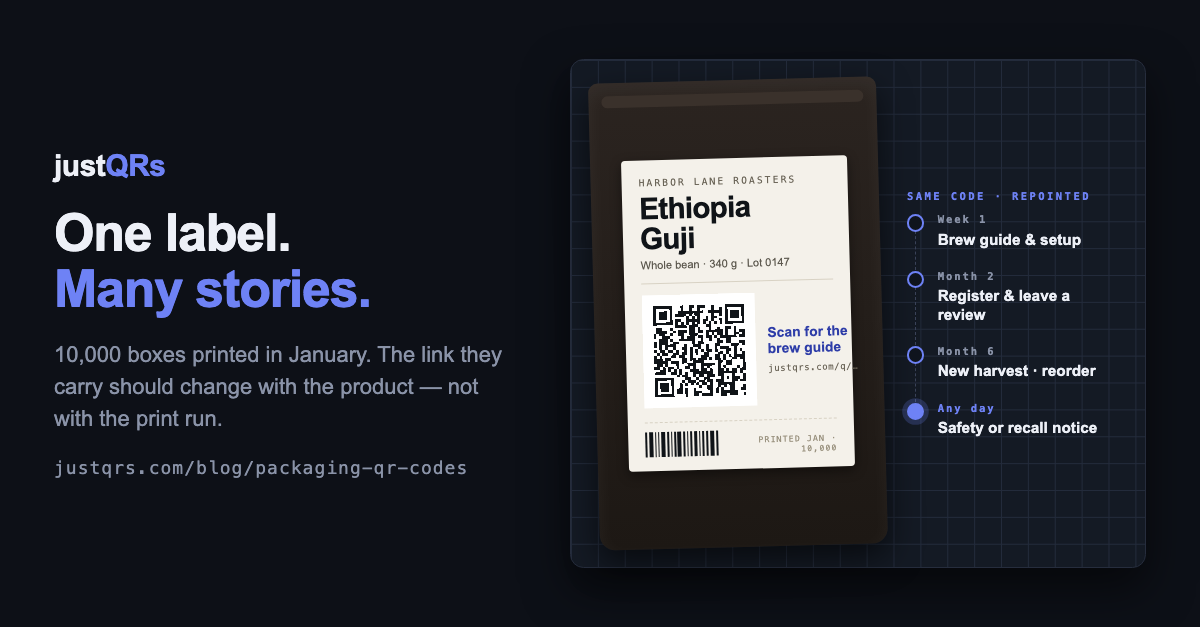
You approved the carton artwork in January and printed 10,000. By March, a step on the quick-start card no longer matched the app. In June, the marketplace listing your review link pointed at was merged into another one. In September, a batch shipped with a different supplier's part inside. The boxes in the warehouse — and on the shelf, and in the back of the distributor's van — still say exactly what they said in January.
Packaging is the longest-lived print most businesses ever produce. It's ordered by the thousand to get the unit cost down, it sits in inventory for months, and a single unit can be on a shelf, in a cupboard, and finally in a recycling bin a year after the artwork was signed off. Everything the pack says is frozen at the print run. Everything the product is keeps moving.
A QR code is the one element on the pack that doesn't have to be frozen — if you set it up right.
Why packaging codes go wrong
Most QR codes on packaging are added late in the artwork process and fail in predictable ways:
- They point at a page that moves. A product page, a PDF on the web server, a marketplace listing. Sites get redesigned, PDFs get renamed, listings get merged. The code survives; the destination doesn't.
- They try to say everything. One code for the manual, one for registration, one for reviews — three codes on a three-inch panel, and a customer who scans none of them.
- Nobody knows what they did. The product sold, the pack went out, and no one can say whether a single person scanned it or what they wanted when they did.
The mistake is treating the code as a label — fixed text — when it's really a channel: the one line you have to every unit after it leaves the dock.
One code, one product, many stories
The better approach is one dynamic code per product, with a destination you change as the product's life unfolds. A dynamic code encodes a short link you control; what that link opens is yours to edit after printing. The printed code never changes while the story behind it does.
Over a typical product's life, the most useful destination keeps changing:
- Unboxing (day 1). Setup instructions, a sixty-second how-to video, the quick-start guide in the customer's language. More people scan at this moment than at any other, and it's when they most need help.
- The first weeks. Warranty registration, a "how's it going?" check-in, care and refill instructions.
- Established (month two onward). A review request, a reorder or refill link, the companion app.
- Whenever it's needed. A support article for a problem you've just discovered, a change of ingredients — or, rarely but importantly, a safety notice or recall. A static code can't reach a box that's already shipped. A dynamic one reaches every box in an afternoon.
You don't need a different page for every unit to do this. One code per SKU — or per SKU per market, if the languages or regulations differ — is usually right. One code per unit is a serialization project, not a marketing one.
What about the barcode that's already there?
The UPC or EAN barcode on your pack is for the checkout scanner, and a marketing QR code doesn't replace it. Worth knowing: GS1, the organization behind those barcodes, is running an industry initiative called Sunrise 2027 to have retail point-of-sale systems read 2D barcodes — including a GS1 flavor of QR code — alongside the UPC by the end of 2027. It's voluntary and the UPC isn't going away, but if you sell through major retailers you'll hear about it. The code in this article is a customer-facing link, not a checkout code. Keep it on a different panel from the UPC so the register reads the right one.
Designing the destination
- A mobile page, not a print PDF. It will be read in a kitchen or a garage, on cellular, one-handed. A short page with three to five labeled links beats a forty-megabyte brochure.
- Lead with what the person holding the box wants right now, and make one ask. In week one that's "how do I set this up," not "leave us a review." Reorder the page as the product ages.
- Match the market, and print a fallback. If the same SKU ships to two countries, use two codes so each opens the right language. Put a short typed URL under the code for anyone whose camera won't cooperate.
Print notes specific to packaging
The general rules are in our print checklist. Packaging adds a few of its own:
- At least 2 cm (0.8 in) across, measured without its margin. A short link keeps the pattern sparse enough to scan that small; a long URL doesn't.
- A flat panel. Not across a seam, a fold, or a tight curve. On a can or bottle, the flattest part of the label. Shrink sleeves distort — test on the applied sleeve.
- Mind the material. Kraft, clear film, metallic, and foil all lower contrast: print a white box behind the code, and keep gloss varnish off it.
- Protect the quiet zone — about four squares of margin on every side — from the die line, a crimp, or a seam.
- Test the real thing. The filled, sealed package under shop lighting with three different phones, not the flat dieline on a monitor.
When a free static code is all you need
Ask honestly: will this pack ever need to say something different before the last unit is sold? If the answer is genuinely no — the code opens your homepage, or a maker's contact card, or a brand page you'll keep alive as long as the product exists — a static code costs nothing and never expires, and it's the right tool. The same goes for a small-batch maker printing two hundred labels at a time: you can simply reprint. The moment the answer might be yes — instructions, offers, reviews, support, safety — you want a code you can repoint.
The packaging QR checklist
- One dynamic code per SKU (per market if needed); not one per unit
- Destination planned by stage: unboxing → registration → review or reorder → support
- Mobile-first page, one clear ask, fast on cellular
- At least 2 cm, on a flat panel, clear of seams, folds, and the UPC
- White box on kraft, clear, foil, or metallic; no gloss over the code
- Quiet zone intact after die-cutting and sealing
- Call to action beside it and a typed fallback URL
- Tested on the filled, sealed pack with three phones
- A register kept: SKU, code, where it's printed, what it points to today, who owns it
Where justQRs fits
- Dynamic codes print small and never change. A justQRs dynamic code encodes only its short link — justqrs.com/q/ plus seven characters — so the pattern stays sparse enough for a hang tag. Edit the destination from the dashboard whenever the product's story moves on; every box already shipped follows.
- A hosted page when you don't want to build one. A hosted link page with a headline and up to 20 links — brew guide, register, review, reorder — or upload a PDF manual (up to 20 MB) and justQRs hosts it as a mobile-friendly page. An app-download page sends iPhone scanners to the App Store and Android scanners to Google Play from one code.
- Catalog-sized, without the clicking. Bulk-import a CSV of SKUs and destinations (up to 100 rows per upload) or create and repoint codes from your own systems with the REST API. $9.99/month or $89/year covers 500 dynamic codes with unlimited scans and five team seats; add-on packs of 500 are self-serve from the billing page when a catalog outgrows that.
- See which products get scanned. Daily scans and uniques per code, by country, city, device, OS, and browser — engagement signal by SKU that shelf sales can't give you, with no tracking pixel and no personal profiles.
- Nothing is deleted if you lapse. Codes and analytics stay stored; dynamic codes pause and show a plain "this code is paused" page — no ads — until you subscribe again.
A free justQRs account designs and downloads static QR codes forever — no watermarks, no expiry. And if you want codes you can edit and track, every feature is free for 7 days, no card required.
Need a QR code? Generate a static code free — no account — or see what dynamic codes cost.