QR Codes for Real Estate: Yard Signs and Flyers That Update Themselves
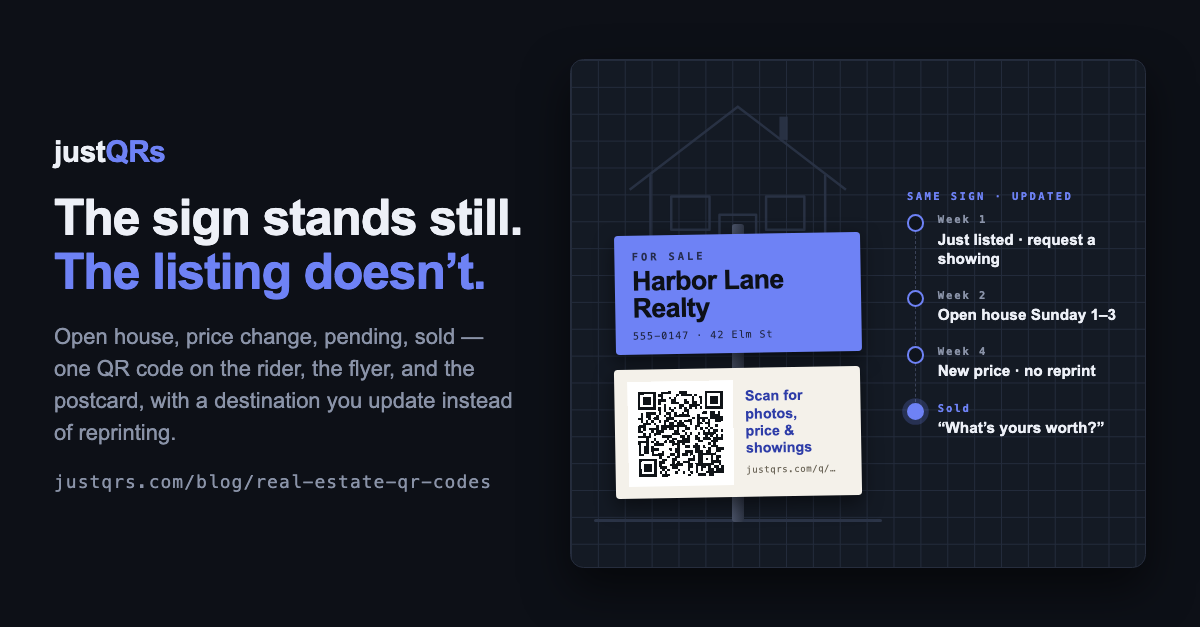
The sign went in the ground on a Thursday and the flyer box was full by the weekend. In week two the price came down and the open house moved from Saturday to Sunday — and every flyer on the street still said the old number and the old day. In week five the listing went pending, and people driving past were still pulling flyers and calling about a house they couldn't buy.
A listing is one of the most changeable things a small business ever advertises, and it's advertised almost entirely in print: the yard sign, the rider, the flyer, the just-listed postcard, the directional on the corner. Every one of them is fixed the moment it's printed. The listing isn't.
A QR code is the one element on the sign that doesn't have to be fixed — if you set it up right.
Why most real-estate QR codes disappoint
Agents were early to QR codes, and many stopped using them for good reasons:
- The code points at something that moves. An MLS link that changes on relisting, a brokerage page that gets redesigned, a flyer PDF someone renames. The sign is fine; the destination is gone.
- It opens a desktop page on a phone. A buyer at the curb gets a homepage with a search box, or a 20-megabyte PDF over cellular, and closes it.
- It stays printed after the story changes. Pending, sold, price reduced, open house this weekend — the sign can't say any of it without a new rider.
- Nobody can tell whether it worked. Without scan data, print marketing is a feeling, not a number.
The fix for all four is the same: treat the code as a channel that stays open for the life of the listing, not as a line of text on the sign.
One code per listing, a destination that moves with it
The better approach is one dynamic code per listing, printed on everything for that property — rider, flyer, postcard, directional — pointing at a destination you change as the listing moves. A dynamic code encodes a short link you control; what that link opens is yours to edit after printing. The sign never changes while the page behind it does.
Over a typical listing's life, the best destination keeps changing:
- Just listed. Photos, price, beds and baths, the virtual tour, and one button: request a showing. This is when curbside scans peak and people want the basics.
- Open house week. The same page with the date and time at the top, directions, and a sign-in link so you capture the visitor instead of a clipboard.
- Price change. Update the number once; every sign, flyer, and postcard already in the world shows it. No reprint, no sticker, no "call for price."
- Pending. Swap in "under contract — here are three similar homes I have coming up" and a contact link. The sign keeps producing leads instead of wasted calls.
- Sold. The code becomes your best neighborhood ad: "Sold in 11 days. Thinking of selling? Here's what your home might be worth." The sign stays up for weeks after closing; make them count.
One code per listing is almost always right. Use a second only when you genuinely want to compare placements — yard sign versus mailer — and that's a measurement decision, not a listing one.
What to keep static (and free)
Not everything on your print should be dynamic, and it's worth being honest about which is which.
- Your contact card. A vCard QR code on your business card or the agent panel of the sign saves your name, number, email, and brokerage straight into the scanner's phone. It works offline and never expires. If your details are stable, a free static code is exactly right; if you change brokerages often, that's the one worth making dynamic.
- A Wi-Fi code for the open house. Guests pulling up the listing on their own phones is a good thing, and a static Wi-Fi code on the counter costs nothing.
The rule: if it changes with the listing, it's dynamic. If it changes with your career, decide once. If it never changes, it's static and free.
Designing the page behind the code
The code is only as good as what it opens. Build the page for a buyer standing on a sidewalk:
- Mobile first, one ask. Photos, then price and basics, then one button — a showing at "just listed," a home valuation at "sold." A hosted page with a headline and a handful of labeled links beats a flyer PDF every time.
- Capture the lead on the page, not in a phone call. Link to a short form — name, phone, "when would you like to see it?" — so an anonymous scan becomes a contact.
- Keep compliance visible. Brokerage name, license number, and fair-housing statement belong on the page the way they belong on the sign. Check your state and brokerage rules for what a linked page must carry.
Print notes for signs, riders, and flyers
The general rules are in our print checklist. Real-estate print adds a few of its own:
- Size for the distance. A code should be about one-tenth as wide as the distance it's scanned from. Two centimeters works on a flyer in the hand; a rider read from the sidewalk two or three meters away needs a code 20–30 cm (8–12 in) across. Most riders are too small — give the code its own rider or its own panel.
- Put it where a person can stand. A code at the top of the post or at the back of a corner lot gets admired, not scanned. Knee-to-chest height, facing where people walk or park.
- Dark on light, matte, with a margin. A dark code on a white rider scans; a white code reversed out of your brand color on a glossy panel often doesn't in sun. Leave about four squares of clear margin on every side, and print "Scan for photos, price & showings" beside it — people scan when they know what they'll get.
- Test it in the ground. Scan the installed sign from the sidewalk with three different phones, in daylight and at dusk — then again a week later, because glare, dew, and a bent rider all change the answer.
The listing QR checklist
- One dynamic code per listing, on the rider, flyer, postcard, and directional
- A destination plan by stage: just listed → open house → price change → pending → sold
- A mobile page with photos, price, one ask, and a lead link — not a PDF
- Brokerage, license, and fair-housing details on the linked page
- A static vCard for your card; static codes for anything that never changes
- Code sized for the viewing distance — at least 20 cm on a sign read from the sidewalk
- Mounted at standing height, dark on light, matte, four-square margin, call to action beside it
- Tested in the ground with three phones, and again a week later
- A register kept: listing, code, where it's printed, what it points to today
Where justQRs fits
- Dynamic codes that never change on the sign. A justQRs dynamic code encodes only its short link — justqrs.com/q/ plus seven characters — so it prints clean on a rider or a postcard. Edit the destination from the dashboard when the listing goes to open house, drops in price, goes pending, or sells; every sign and flyer already in the world follows.
- A hosted page when you don't have one per listing. A hosted link page with a headline and up to 20 links — photos, virtual tour, request a showing, open-house details — or a hosted business page with your name, phone, email, address, and hours. Have only a PDF flyer today? Upload it (up to 20 MB) and justQRs hosts it as a mobile-friendly page.
- Your card, free. Static vCard QR codes are free forever — design one to match your card, download it as SVG or PDF, and it saves your contact into their phone in one scan. A dynamic vCard, if you'd rather it survive a brokerage change, is on the paid plan.
- Know which sign worked. Daily scans and uniques per code, by country, city, device, OS, and browser — whether the yard sign or the mailer drove the showing requests, with no tracking pixel and no personal profiles.
- Built for a small office. $9.99/month or $89/year covers 500 dynamic codes with unlimited scans and five team seats, so a brokerage can give several agents a login under one bill. Add-on packs of 500 codes or 5 seats are self-serve from the billing page.
- Nothing is deleted if you lapse. Codes and analytics stay stored; dynamic codes pause and show a plain "this code is paused" page — no ads — until you subscribe again.
A free justQRs account designs and downloads static QR codes forever — no watermarks, no expiry. And if you want codes you can edit and track, every feature is free for 7 days, no card required.
Need a QR code? Generate a static code free — no account — or see what dynamic codes cost.